
Discover the best AI assistants for daily work in 2026. Compare top AI tools for writing, scheduling, meetings, automation, and productivity.
Best AI Assistants for Daily Work in 2026
Artificial intelligence is no longer just a futuristic idea or a chatbox that answers questions. Today, the best AI assistants for daily work are practical tools that help people write faster, manage time better, stay organized, and reduce the small repetitive tasks that drain energy during the day. If you are a blogger, freelancer, marketer, or business owner, the right AI assistant can feel like a quiet second brain that works beside you.
The biggest shift in 2026 is simple: people are not just looking for AI that talks. They want AI that does something useful. That means helping with writing, meetings, scheduling, research, automation, and task management in a way that actually saves time. If your goal is to work smarter, not harder, choosing the right AI assistant can make a real difference.
If you want curated tools and useful recommendations, check my Amazon store here: Visit my recommended products.

Why AI assistants are trending
AI assistants are becoming popular because they solve real daily problems. Most people do not need more information; they need more time. That is why tools that can draft emails, summarize documents, manage calendars, and automate routine work are getting so much attention.
The trend is moving toward assistants that are more personal, more connected, and more action-oriented. Instead of only answering prompts, they can support real workflows across writing, scheduling, meetings, and operations. This makes them more valuable for professionals who are already overloaded.
Best AI assistants for daily work
Comparison Table
| AI Assistant | Best For | Main Strength | Ideal User |
|---|---|---|---|
| ChatGPT | Writing, brainstorming, research | Flexible and easy for everyday tasks | Bloggers, freelancers, marketers |
| Microsoft Copilot | Office productivity | Works smoothly inside Microsoft apps | Office workers, business teams |
| Google Gemini | Google Workspace tasks | Best for Gmail, Docs, and Google users | Google ecosystem users |
| Zapier AI | Automation | Connects apps and automates workflows | Entrepreneurs, operations teams |
| Motion | Scheduling and planning | Combines tasks, calendar, and time blocking | Busy professionals |
| Reclaim.ai | Calendar management | Protects focus time and organizes days | Founders, managers, creators |
| Otter.ai | Meetings and notes | Transcription and meeting summaries | Teams, consultants, remote workers |
| Notion AI | Notes and knowledge | Organizes documents and summaries | Creators, teams, planners |
Best AI assistants by use case
ChatGPT for everyday work
If you want one assistant that can handle many jobs, ChatGPT is one of the strongest all-round choices. It is especially useful for writing blog drafts, brainstorming ideas, rewriting content, and helping with research. For content creators and bloggers, that makes it one of the easiest tools to use every day.
Microsoft Copilot for office productivity
If your work happens mostly inside Microsoft 365, then Copilot is a smarter fit. It works naturally with Word, Excel, Outlook, and Teams, so it feels more like part of your workflow than a separate tool. That makes it especially useful for office users and business teams.
Google Gemini for Google Workspace
If you live inside Google tools, Gemini may feel more comfortable. It is helpful for Gmail, Docs, and other Google-based tasks, which makes it practical for users who already rely on the Google ecosystem. A tool that fits your daily habits is often more valuable than one with flashy features.
Motion and Reclaim.ai for scheduling

For people who struggle with time management, Motion and Reclaim.ai are worth attention. These tools help organize calendars, protect focus time, and make daily planning less stressful. If your schedule is full of meetings and task switching, this kind of support can feel like a major relief.
Otter.ai for meetings and notes
For meetings and notes, Otter.ai is a strong option. It helps transcribe conversations, summarize discussions, and turn meeting talk into useful action points. That is a big advantage for teams that meet often and need clear follow-up.
Zapier AI for automation
If your goal is automation, Zapier AI stands out. It connects apps and helps reduce repetitive manual work, which is why it is becoming more important in modern AI workflows. For business owners, automation often saves more time than writing alone.
Chart section
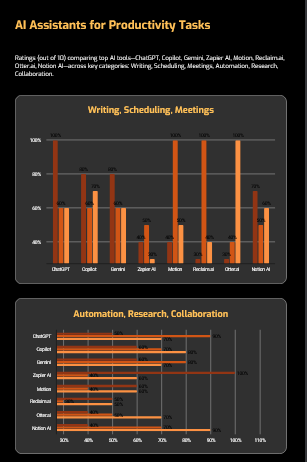
Best AI Assistants by Daily Use Case
| AI Assistant | Writing | Scheduling | Meetings | Automation | Research | Collaboration |
|---|---|---|---|---|---|---|
| ChatGPT | 10 | 6 | 6 | 5 | 9 | 7 |
| Copilot | 8 | 6 | 7 | 6 | 7 | 8 |
| Gemini | 8 | 6 | 6 | 6 | 8 | 7 |
| Zapier AI | 4 | 5 | 3 | 10 | 4 | 6 |
| Motion | 4 | 10 | 5 | 6 | 4 | 6 |
| Reclaim.ai | 3 | 10 | 4 | 5 | 3 | 5 |
| Otter.ai | 3 | 4 | 10 | 4 | 5 | 7 |
| Notion AI | 7 | 5 | 6 | 4 | 7 | 9 |
Best AI Assistants by Daily Use Case by Case View
Which AI assistant should you choose?
Your best choice depends on how you work.
Choose ChatGPT if you need the most flexible assistant for writing, brainstorming, and everyday productivity.
Choose Copilot if your work already runs on Microsoft apps.
Choose Gemini if you live in Google Workspace.
Choose Motion or Reclaim.ai if scheduling and time management are your biggest pain points.
Choose Otter.ai if meetings and notes take too much of your day.
Choose Zapier AI if you want workflow automation across multiple tools.
The smartest approach is to match the tool to the problem. That is how AI becomes genuinely useful instead of just interesting.
How to make this article rank better
If you want this post to perform well in search, keep the main keyword in the title, introduction, one subheading, and conclusion. Use related keywords like AI assistant for work, AI productivity assistant, best AI assistant for productivity, and AI assistant comparison throughout the article.
You should also include:
- a comparison table,
- a chart,
- FAQ section,
- short paragraphs,
- and a clear recommendation for different user types.
Search engines usually reward content that is useful, structured, and easy to read. Readers also stay longer when the article answers their question without too much filler.
FAQ
What is the best AI assistant for daily work?
ChatGPT is the best all-around option for most people because it is flexible and useful for many tasks.
Which AI assistant is best for office work?
Microsoft Copilot is a strong choice for people who use Microsoft 365 every day.
Which AI assistant is best for scheduling?
Motion and Reclaim.ai are excellent for calendar planning and focus management.
Can AI assistants really save time?
Yes. They can reduce repetitive work, improve organization, and help with writing, meetings, and automation.
FAQ Schema
json{
  "@context": "https://schema.org",
  "@type": "FAQPage",
  "mainEntity": [
    {
      "@type": "Question",
      "name": "What is the best AI assistant for daily work?",
      "acceptedAnswer": {
        "@type": "Answer",
        "text": "ChatGPT is the best all-around option for most people because it is flexible and useful for many tasks."
      }
    },
    {
      "@type": "Question",
      "name": "Which AI assistant is best for office work?",
      "acceptedAnswer": {
        "@type": "Answer",
        "text": "Microsoft Copilot is a strong choice for people who use Microsoft 365 every day."
      }
    },
    {
      "@type": "Question",
      "name": "Which AI assistant is best for scheduling?",
      "acceptedAnswer": {
        "@type": "Answer",
        "text": "Motion and Reclaim.ai are excellent for calendar planning and focus management."
      }
    },
    {
      "@type": "Question",
      "name": "Can AI assistants really save time?",
      "acceptedAnswer": {
        "@type": "Answer",
        "text": "Yes. They can reduce repetitive work, improve organization, and help with writing, meetings, and automation."
      }
    }
  ]
}
Featured image prompt
A modern workspace with a laptop showing AI productivity apps, calendar icons, email icons, note-taking interface, and subtle futuristic digital elements, clean desk setup, professional blog style, bright natural lighting, high detail, realistic, widescreen format.
Image alt text ideas
- Best AI assistants for daily work comparison
- AI productivity tools for daily tasks
- AI assistant dashboard on laptop screen
- Productivity and automation with AI tools
- Modern workspace with AI software
Internal link ideas
- AI productivity tools
- best AI tools for bloggers
- AI content writing guide
- digital marketing tools for creators
- Amazon recommendations page: Visit my recommended products
Final conclusion
The best AI assistants for daily work are the ones that make your routine simpler, not more complicated. If you choose based on your real workflow, you will get more value from the tool and less frustration from learning it. For many people, the future of productivity is not about doing everything alone — it is about using smart tools that help you move faster with less stress.